Apex - Arrays

Arrays in Apex are basically the same as Lists in Apex. There is no logical distinction between the Arrays and Lists as their internal data structure and methods are also same but the array syntax is little traditional like Java.
Below is the representation of an Array of Products: 
Index 0 - HCL 
Index 1 - H2SO4 
Index 2 - NACL 
Index 3 - H2O 
Index 4 - N2 
Index 5 - U296
Syntax:
<String> [] arrayOfProducts = new List<String>();
Example:
Suppose, we would like to store name of our Products, then we could use the Array in which we could store the Product Names as shown below. You could access the particular Product by specifying the index.
//Defining array
String [] arrayOfProducts = new List<String>();
//Adding elements in Array
arrayOfProducts.add('HCL');
arrayOfProducts.add('H2SO4');
arrayOfProducts.add('NACL');
arrayOfProducts.add('H2O');
arrayOfProducts.add('N2');
arrayOfProducts.add('U296');

for (Integer i = 0; i<arrayOfProducts.size(); i++) {
    //This loop will print all the elements in array
    system.debug('Values In Array: '+arrayOfProducts[i]);   
}
Accessing array element by using index:
You could access any element in array by using the index as shown below:
//Accessing the element in array
//We would access the element at Index 3
System.debug('Value at Index 3 is :'+arrayOfProducts[3]);

Apex - Strings

String in Apex, as in any other programming language, is any set of characters with no character limit.
Example:
String companyName = 'Abc International';
System.debug('Value companyName variable'+companyName);

String Methods

String class in Salesforce has many methods. We will take a look at some of the most important and frequently used string methods in this chapter.

contains

This method will return true if the given string contains the substring mentioned.
Syntax:
public Boolean contains(String substring)
Example:
String myProductName1 = 'HCL';
String myProductName2 = 'NAHCL';
Boolean result = myProductName2.contains(myProductName1);
System.debug('O/p will be true as it contains the String and Output is: '+result );

equals

This method will return true if the given string and the string passed in the method have the same binary sequence of characters and they are not null. You could compare the SFDC record id as well using this method. This method is case sensitive.
Syntax:
public Boolean equals(Object string)
Example:
String myString1 = 'MyString';
String myString2 = 'MyString';
Boolean result = myString2.equals(myString1);
System.debug('Value of Result will be true as they are same and Result is:'+result);

equalsIgnoreCase

This method will return true if stringtoCompare has the same sequence of characters as the given string. However, this method is not case sensitive.
Syntax:
public Boolean equalsIgnoreCase(String stringtoCompare)
Example:
Below code will return true as string characters and sequence are same, ignoring the case sensitivity.
String myString1 = 'MySTRING';
String myString2 = 'MyString';
Boolean result = myString2.equalsIgnoreCase(myString1);
System.debug('Value of Result will be true as they are same and Result is:'+result);

remove

This method removes the string provided in stringToRemove from given string. This is useful when you want to remove some specific characters from string and don't know the exact index of the characters to remove. This method is case sensitive and will not work if the same character sequence occurs but case is different.
Syntax:
public String remove(String stringToRemove)
Example:
String myString1 = 'This Is MyString Example';
String stringToRemove = 'MyString';
String result = myString1.remove(stringToRemove);
System.debug('Value of Result will be 'This Is Example' as we have removed the MyString and Result is :'+result);

removeEndIgnoreCase

This method removes the string procvided in stringToRemove from the given string but only if it occurs at the end. This method is not case sensitive.
Syntax:
public String removeEndIgnoreCase(String stringToRemove)
Example:
String myString1 = 'This Is MyString EXAMPLE';
String stringToRemove = 'Example';
String result = myString1.removeEndIgnoreCase(stringToRemove);
System.debug('Value of Result will be 'This Is MyString' as we have removed the 'Example' and Result is :'+result); 

startsWith

This method will return true if the given string starts with the prefix provided in the method.
Syntax:
public Boolean startsWith(String prefix)
Example:
String myString1 = 'This Is MyString EXAMPLE';
String prefix = 'This';
Boolean result = myString1.startsWith(prefix);
System.debug(' This will return true as our String starts with string 'This' and the Result is :'+r

Apex - Variables

Apex Variables

Java and Apex are similar in many manners. Variable declaration in Java and Apex is also quite same. Below are some examples to show how to declare local variables.
String productName = 'HCL';
Integer i=0;
Set<string> setOfProducts = new Set<string>();
Map<id, string> mapOfProductIdToName = new Map<id, string>();
Note that all the variables are assigned with the value null.

Declaring Variables

You could declare the variables in Apex like String and Integer as follows:
String strName = 'My String';//String variable declaration
Integer myInteger = 1;//Integer variable declaration
Boolean mtBoolean = true;//Boolean variable declaration

Apex variables are Case-Insensitive

This means that below code will throw an error since the variable 'i' has been declared two times and both will be treated as same.
Integer m = 100;
for (Integer i = 0; i<10; i++) {
    integer m=1; //This statement will throw an error as m is being declared again
    System.debug('This code will throw error');
}

Scope of Variables

An Apex variable is valid from the point where it is declared in code. So it is not allowed to redefine the same variable again and in code block. Also, if you declare any variable in a method then that variable scope will be limited to that particular method only. However, class variables can be accessed through out the class.
Example:
//Declare variable Products
List<string> Products = new List<strings>();
Products.add('HCL');

//You cannot declare this variable in this code clock or sub code block again
//If you do so then it will throw the error as the previous variable in scope
//Below statement will throw error if declared in same code block
List<string> Products = new List<strings>();

Apex - Data Types

Understanding the Data Types

As we have studied, the Apex language is strongly typed so every variable in Apex will be declared with the specific data type. All apex variables are initialized to null initially. As a best practice developer has to make sure it should get assigned proper value otherwise such variables when used, will throw null pointer exceptions or any unhandled expections.
Apex supports the following data-types:
  • Primitive (Integer, Double, Long, Date, Datetime, String, ID, or Boolean)
  • Collections (Lists, Sets and Maps) (To be covered in Chapter 6)
  • sObject
  • Enums
  • Classes, Objects and Interfaces (To be covered in Chapter 11, 12 and 13)
In this chapter, we will look at all the Primitive Data Types, sObjects and Enums. We will be looking at Collections, Classes, Objects and Interfaces in upcoming chapters since they are key topics to be learnt individually.

Primitive Data Type

Integer
Any 32 bit number which does not include any decimal point. The value range is -2,147,483,648 and a maximum value of 2,147,483,647.
Example: We want to declare a variable which would store the quantity of barrels which needs to be shipped to buyer of chemical processing plant.
Integer barrelNumbers = 1000;
system.debug(' value of barrelNumbers variable: '+barrelNumbers);
System.debug() is function which prints the value of variable so that we could use this to debug or to get to know what value the variable holds currently.
Paste the above code to Developer console and the click on execute. Once logs are generated then it will show the value of variable "barrelNumbers" as 1000.
Boolean
This variable can either be true, false or null. Many times, this type of variables can be used as flag in programming to identify the particular condition set or not set.
Example: If we would like to set shipmentDispatched as true, then it can be declared as:
Boolean shipmentDispatched;
shipmentDispatched = true;
System.debug('Value of shipmentDispatched '+shipmentDispatched);
Date
This is the variable of type date. This can only store the date not the time. For saving date along with time we would need to store it in variable of DateTime.
Example:
//ShipmentDate can be stored when shipment is dispatched.
Date ShipmentDate = date.today();
System.debug('ShipmentDate '+ShipmentDate);
Long
This is a 64-bit number without a decimal point. Use this data type when you need a range of values wider than those provided by Integer.
Example: If we would like to store the company revenue, then we would use data type as Long.
Long companyRevenue  = 21474838973344648L;
system.debug('companyRevenue'+companyRevenue);
Object
We can refer this as any data type which is supported in Apex. For example, Class variable can be object of that class, and the sObject generic type is also an object and similarly specific object type like Account is also an Object.
Example:
Account objAccount = new Account (Name = 'Test Chemical');
system.debug('Account value'+objAccount);
You can create an object of predefined class as well, as given below:
//Class Name: MyApexClass
MyApexClass  classObj = new MyApexClass();
This is the class object which will be used as class variable. No need to execute this code, this is just for reference.
String
String is any set of characters within single quotes. It does not have limit of number of characters, but the heap size would be used to determine so that Apex program should not monopolize the resources and does not grow too large.
Example:
String companyName = 'Abc International';
System.debug('Value companyName variable'+companyName);
Time
This variable is used to store the particular time. This variable should always be declared with system static method.
Blob
The Blob is collection of binary data which is stored as object. This will be used when we want to store the attachment in salesforce into a variable. This data type converts the attachments in a single object. When we need to convert the blob into string then we could use toString and valueOf methods to convert it to string when required.

sObject

This is a special data type in Salesforce. It is similar to a table in SQL and contains fields which are similar to columns in SQL. There are two types of sObjects: Standard and Custom.
For example, Account is a standard sObject and any other user defined object (like Customer object that we created) is Custom sObject.
Example:
//Declaring an sObject variable of type Account
Account objAccount = new Account();

//Assignment of values to fields of sObjects
objAccount.Name = 'ABC Customer';
objAccount.Description = 'Test Account';
System.debug('objAccount variable value'+objAccount);

//Declaring an sObject for custom object APEX_Invoice_c
APEX_Customer_c objCustomer = new APEX_Customer_c();

//Assigning value to fields
objCustomer.APEX_Customer_Decscription_c = 'Test Customer';
System.debug('value objCustomer'+objCustomer);

Enum

Enum is an abstract data type that stores one value of a finite set of specified identifiers. You could use the keyword Enum to define an Enum. Enum can be used as any other data type in Salesforce.
Example:
Suppose, you would like to declare the possible names of Chemical Compound, then you could do something like this:
//Declaring enum for Chemical Compounds
public enum Compounds {HCL, H2SO4, NACL, HG}
Compounds objC = Compounds.HCL;
System.debug('objC value: '+objC);
What is Apex

What is Apex?

Apex is a proprietary language which has been developed by Salesforce.com. As per the official definition, Apex is a strongly typed, object-oriented programming language that allows developers to execute the flow and transaction control statements on the Force.com platform server in conjunction with calls to the Force.com API.
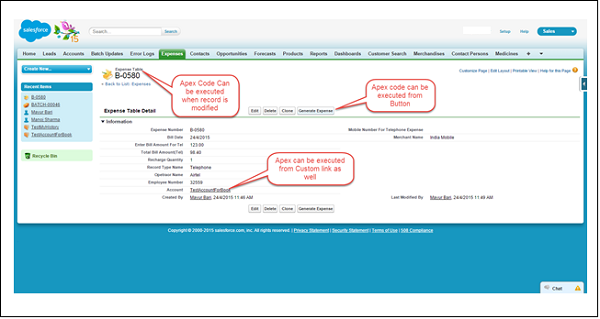
It has a Java-like syntax and acts like database stored procedures. It enables the developers to add business logic to most system events, including button clicks, related record updates, and Visualforce pages.Apex code can be initiated by Web service requests and from triggers on objects. Apex is included in Performance Edition, Unlimited Edition, Enterprise Edition, and Developer Edition.
apex_code_execution_scenario

Features of Apex as a Language

Integrated
Apex has built in support for DML operations like INSERT, UPDATE, DELETE and also DML Exception handling. It has support for inline SOQL and SOSL query handling which returns the set of sObject records. We will study the sObject, SOQL, SOSL in detail in future chapters.
Java like syntax and easy to use
Apex is easy to use as it uses the syntax like Java. For example, variable declaration, loop syntax and conditional statements.
Strongly Integrated With Data
Apex is data focused and designed to execute multiple queries and DML statements together. It issues multiple transaction statements on Database.
Strongly Typed
Apex is strongly typed language. It uses direct reference to schema objects like sObject and any invalid reference quickly fails if it is deleted or if is of wrong data type.
Multitenant Environment
Apex runs in a multitenant environment. Consequently, the Apex runtime engine is designed to guard closely against runaway code, preventing it from monopolizing shared resources. Any code that violates limits fails with easy-to-understand error messages.
Upgrades Automatically
Apex is upgraded as part of Salesforce releases. We don't have to upgrade it manually.
Easy Testing
Apex provides built-in support for unit test creation and execution, including test results that indicate how much code is covered, and which parts of your code could be more efficient.

When Should Developer choose Apex?

Apex should be used when we are not able to implement the complex business functionality using the pre-built and existing out of the box functionalities. Below are the cases where we need to use apex over Salesforce configuration.

Apex Applications

We can use Apex when we want to:
  • Create Web services with integrating other systems.
  • Create email services for email blast or email setup.
  • Perform complex validation over multiple objects at the same time and also custom validation implementation.
  • Create complex business processes that are not supported by existing workflow functionality or flows.
  • Create custom transactional logic (logic that occurs over the entire transaction, not just with a single record or object) like using the Database methods for updating the records.
  • Perform some logic when a record is modified or modify the related object's record when there is some event which has caused the trigger to fire.

Working Structure of Apex

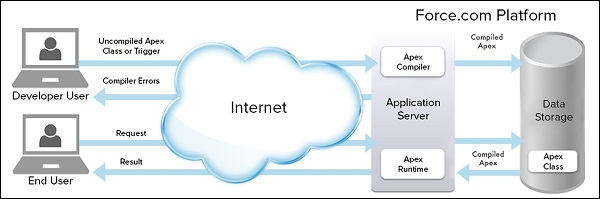
As shown in the below diagram (Reference: Salesforce Developer Documentation), Apex runs entirely on demand Force.com Platform:
apex_compilation_of_apex_code
Flow of Actions:
There are two sequence of actions when the developer saves the code and when an end user perform some action which invokes the Apex code as shown below:
  • Developer Action: When a developer writes and saves Apex code to the platform, the platform application server first compiles the code into a set of instructions that can be understood by the Apex runtime interpreter, and then saves those instructions as metadata.
  • End User Action: When an end-user triggers the execution of Apex, by clicking a button or accessing a Visualforce page, the platform application server retrieves the compiled instructions from the metadata and sends them through the runtime interpreter before returning the result. The end-user observes no differences in execution time as compared to the standard application platform request.
Since Apex is proprietary language of Salesforce.com, it does not support some features which a general programming language supports. For example, below are some features which Apex does not support:
  • It cannot show the elements in User interface.
  • You cannot change the standard SFDC provided functionality and also it is not possible to prevent the standard functionality execution.
  • Temporary file creation is not supported.
  • Creating multiple threads is also not possible as we could do it in other languages.

Understanding the Apex syntax

Apex code typically contains many things that we might be familiar with from other programming languages.
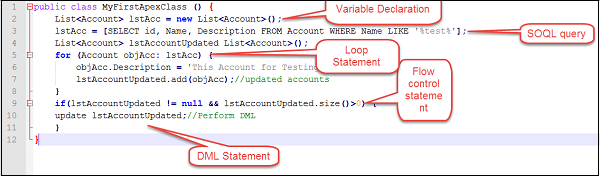
Variable Declaration: As strongly typed language, you must declare every variable with data type in Apex. As seen in the code below (screenshot below), lstAcc is declared with data type as List of Accounts.
SOQL Query: This will be used to fetch the data from Salesforce database. The query shown in screenshot below is fetching data from Account object.
Loop Statement: This loop statement is used for iterating over a list or iterating over a piece of code for specified number of times. In this code shown in screenshot below, iteration will be same as the number of records we have in lstAcc.
Flow Control Statement: The If statement is used for flow control in this code. Based on certain condition, it is decided whether to go for execution or to stop the execution of the particular piece of code. For example, in the code shown below, it is checking whether the list is empty or it contains records.
DML Statement: Performs the records insert, update, upsert, delete operation on the records in database. For example, the below code is updating Accounts with new field value.
Following is a sample of how an Apex code snippet would look like. We are going to study all these Apex programming concepts further in this tutorial.
apex_sample_code_syntax